- DATE:
- AUTHOR:
- The AgileLaw team
Q4 2025 Release Notes: Deep Links & Word Add-in for Briefs
Feature: Deep links
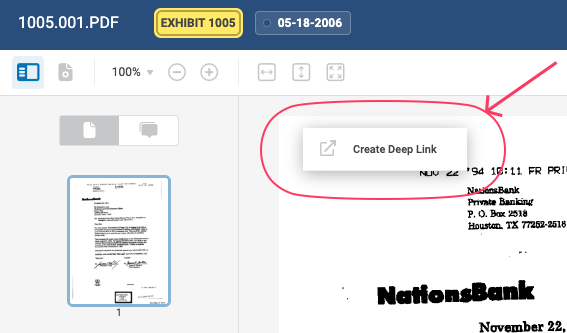
You can now create deep links that open a specific document and page or annotation when you click on the link outside of AgileLaw. It can be used to share a specific exhibit or page with your colleague(s) or to jump to specific exhibits during a deposition (for example, by clicking on a link in a Word outline).
To create a deep link, simply right-click on a page or annotation in the left preview panel or the right main document view. The link is generated and automatically copied to your clipboard for easy pasting.
Feature: Mute Shared Viewer
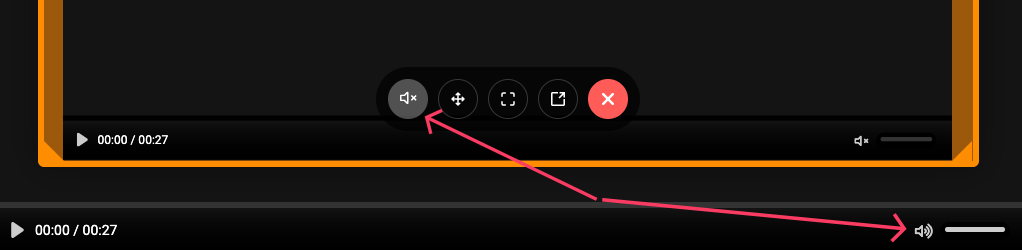
If you use audio or video files as exhibits, playing the file either in presentation mode or by the witness while having the shared viewer open can quickly become a nightmare when you start hearing both players (usually with a few millisecond delay so it sounds like an echo). With this new button, you can mute the shared viewer while still playing audio in the main viewer (or mute them both if you're sitting across from the witness).
New Product: Briefs Add-in for Microsoft Word
Most of our work in the second half of 2025 has been on the development of a Word add-in for use with legal briefs. This add-in will allow you to use the Deep Links feature (mentioned above) to include links in your legal briefs in place of exhibit citations; these "links" get converted to Word controls that automatically populate with the correct exhibit number and format when you are done writing your brief. You can then immediately generate the brief with correct exhibit citations (as well as every exhibit attached in order) to a single PDF that can be submitted as-is to the court.
Here is a link with an overview of the product: https://www.agilelaw.com/briefs
We are looking for beta users to use it and give us feedback, so if you are interested in getting on the waiting list, please let us know or submit your name on the above linked page.
Bugs fixes and other improvements
Added support for HEIC file formats (iPhone photos)
Added support for new fonts (like Aptos) on Microsoft Word documents
Fixed playback on mpeg videos that use cover art as a single frame for the video
Fixed an issue with deleting depositions from the Manage Depositions pop-up
Added revealed sessions to the CSV export
Fixed an issue with downloading large exhibit archives on slow networks
Fixed an issue when adding new user who created another account but never completed the signup process
Fixed a next/previous annotation navigation issue when using a callout from a highlight annotation
Fixed scrolling of a large document list on the tablet app
Fixed the excel formula bar not showing the formula for the witness
Fixed an issue with re-generating a public key for SSO accounts
Replaced our knowledge base and ticketing system widget
Future development
Check out our product roadmap here: AgileLaw Roadmap
Make suggestions and/or vote on features here: AgileLaw Feature Requests